
You're probably dealing with the same mess I see in a lot of Ilkeston businesses. A spare room, a cupboard under the stairs, or a corner of the office has slowly turned into a paper graveyard, with client files, invoices, contracts, and old tax paperwork stacked in no order at all. The problem isn't just space. It's that secure document storage for businesses in Ilkeston has to survive retention rules, retrieval demands, and the kind of bad day no one plans for, like a flood, a misfile, or an HMRC request.
If that sounds familiar, the answer is not “find a bigger cupboard”. It's to build a system that you can defend. For a practical frame on business continuity and why records matter to resilience, the guide to business resilience is worth reading alongside your storage decisions. A local archive is only useful if it makes compliance easier, not harder, and if it still works when the office is shut or the paperwork needs to be found fast.
Why Ilkeston Businesses Need a Smarter Document Storage Plan
A small accountancy firm in Ilkeston can look tidy from the front and still have chaos in the back. One shelf holds client files from this year. Another has boxes nobody wants to open. Somewhere in the middle is the record that proves a contract was signed properly, but no one can say which box it's in. That's not a filing quirk, it's a liability.
Retention law is the starting point. HMRC guidance requires many tax and VAT records to be kept for 6 years, and the Limitation Act 1980 is commonly used as the basis for keeping contracts and agreements for 6 years as well, so document storage in Ilkeston has to work over years, not weeks. In the UK, some documents can be destroyed after their retention period, while others, such as property deeds, should be kept permanently. That makes ad hoc piling and “we'll sort it later” storage a poor fit for any business that wants to stay audit-ready. The business document storage guidance makes the retention point clearly.
The real problem is three-layered
First, there's compliance. Old paper doesn't stop mattering just because it isn't used every day. If you can't prove what you kept, what you moved, and what you destroyed, the archive itself becomes part of the risk.
Second, there's logistics. A filing system that works while a record is hot often falls apart once records go cold. Boxes get stacked too high, labels fade, and retrieval turns into rummaging.
Third, there's physical exposure. Paper sitting in a spare room isn't protected from fire, damp, or simple human error. A business can lose records without any theft at all.
Practical rule: if a document still matters after the working week, it needs a storage plan, not a hiding place.
That's why the right question isn't “Where can I put this?” It's “How do I prove this record is safe, retrievable, and disposable at the right time?” The rest of the article breaks that down into storage type, security, retention, retrieval, and the local option that makes sense for an Ilkeston SME.
The Four Core Types of Secure Storage
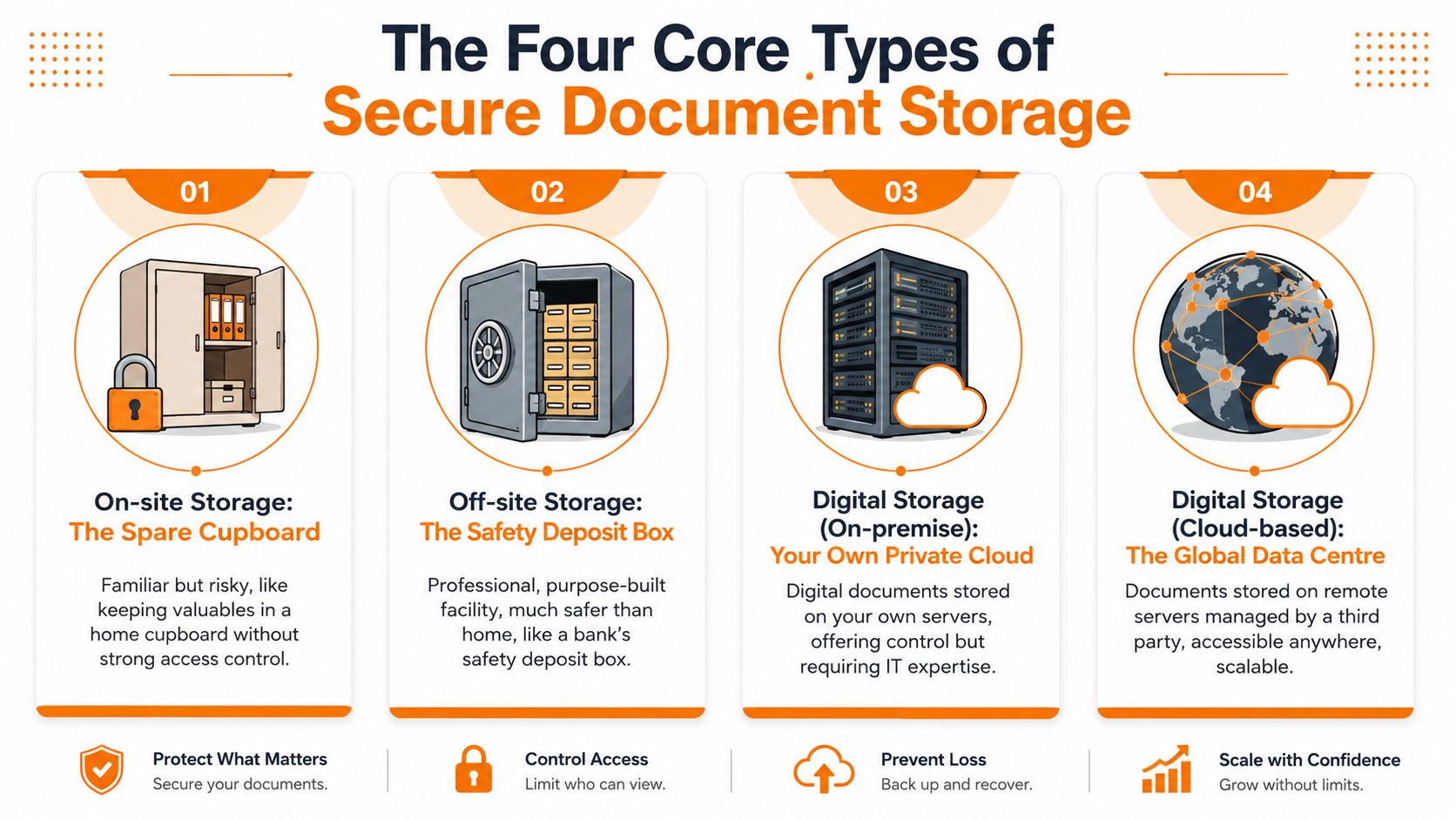
Think about storage the way you'd think about parking a vehicle. You can leave it on the drive, tuck it into a locked garage, put it in a managed car park, or seal it in a container for transport. Each one solves a different problem, and secure document storage for businesses in Ilkeston works the same way.
On-site storage is the spare cupboard
On-site storage is familiar because it's cheap and close. A cupboard, a locked room, or a cabinet in the office gives you immediate access, but it only works if access is controlled and the space is treated like a controlled archive, not a dumping ground. If multiple staff can wander in and drop folders anywhere, you've built convenience, not security.
Off-site storage is the external warehouse
Off-site storage is a cleaner fit for records that you must keep but rarely touch. It separates inactive files from the day-to-day business, which reduces clutter and lowers the chance that a box gets accidentally moved, damaged, or opened by the wrong person. For a local business, the point of off-site storage is not distance for its own sake. It's disciplined separation with reliable retrieval.
Climate-controlled units are the archive vault
Climate-controlled storage matters when paper has to survive long stretches without being handled. Older contracts, documents from damp-prone premises, and records that can't tolerate humidity swings belong in a stable environment, not an overheated office loft or a ground-floor room that sweats through winter. This is the version of storage that protects condition as well as access.
Container storage is the shipping crate
Container storage is built for bulk, movement, and hard-wearing contents. It's useful when a business is moving, downsizing, or boxing up a lot of material that doesn't need a delicate environment. It's not the first choice for sensitive archives, but it earns its keep when the primary issue is volume and fast loading.
If you want a broader view of how storage technologies are structured, compare NAS SAN and object storage alongside physical archives, because the logic of matching the system to the job is the same even when the medium changes.
For businesses comparing physical options locally, the business document storage page is a useful starting point. Use the format that matches your access frequency, not just the cheapest rent.
Bottom line: hot records stay close, cold records go to a controlled archive, and sensitive paper gets the most stable environment you can reasonably justify.
Security Features That Actually Matter
Marketing pages love to list features as if every alarm, camera, and padlock means the same thing. It doesn't. A storage room with cameras is not the same thing as a defensible archive. If your records need to hold up under audit, you need a chain of custody, not just a locked door.
Start with the table stakes
24/7 CCTV, individually coded access control, and logged entry and exit should be treated as basic expectations, not upgrades. If a provider can't say who entered the facility and when, they're not giving you a serious control environment. CCTV helps after the fact, but access logs help you prove the fact in the first place.
That distinction matters because a camera watches an area, while a log records responsibility. One is passive evidence. The other is an audit trail.
Ask what happens to the box, not just the building
The stronger controls are usually box-level controls. Tamper-evident seals, barcode tagging, and written access logs give you a movement history that stands up better than memory or a spreadsheet on someone's desk. The archive guidance from restore best practice on secure document storage specifically points to unique security tags, barcodes on boxes, and barcodes on individual files where higher retrieval precision is needed.
A provider that only knows which unit you rented is giving you location. A provider that can identify which box moved, when it moved, and who handled it is giving you control.
If a file changes hands, the record of that handover should change too.
A serious archive also protects against more than theft. Climate control, fire and flood protection, and geographically separate duplication for critical records are the kinds of features that keep a bad day from becoming a permanent loss. That's not luxury. It's the minimum standard for records that cannot be recreated.
For Ilkeston businesses, the question to ask is blunt: if HMRC asked tomorrow for every movement of box 47 in the last three years, could the provider produce that log? If the answer is vague, keep looking.
GDPR, Retention Rules, and the Chain of Custody
A lot of businesses talk about GDPR as if it only means “don't lose personal data”. That's too shallow. GDPR also forces you to think about why you're holding information, how long you need it, and what happens when the retention period ends. For paper archives, that means your storage plan has to include retention, access, and destruction from day one.
The baseline is clear. HMRC expects many tax and VAT records to be kept for 6 years, and contracts are commonly kept on the same 6-year basis under the Limitation Act 1980. The practical result is that an Ilkeston business can't manage records as a short tidy-up task. The archive has to support a multi-year workflow. The how long to keep business records guide is useful if you need to separate what must stay, what can go, and what should stay permanently.
What a defensible workflow looks like
Start with classification. Tax, HR, legal, customer, and property records don't all follow the same rules, so they shouldn't all go into the same pile.
Then build ingestion. Each box should be logged on intake, labelled clearly, and tied to a retention rule. If the box contains personal data, that matters too, because you need a lawful basis for keeping it, not just a locked room.
After that comes tracking. Every movement should be recorded. If someone takes a file out for audit, a SAR response, or a contract review, the system should show when it left, who took it, and when it returned.
Finally comes destruction. Once the retention period ends, the record should be destroyed securely and the destruction should be documented. If you can't prove disposal, you haven't finished the job.
A broader view on this is covered in data handling compliance help, but the paper version is simple enough: keep what you must, locate it quickly, and destroy it properly when the time comes.
Checklist for the person managing records: classify the file, assign a retention date, log the box, control every retrieval, and keep destruction proof.
GDPR doesn't reward hoarding. It rewards discipline. More storage without a retention schedule just gives you a larger pile of unresolved obligations.
On-Site Versus Off-Site and How to Decide
Most businesses talk themselves into the wrong answer. They keep records on-site because it feels cheaper, then lose time searching for files, or they move everything off-site and then discover they can't get to the records quickly enough when someone asks for them. The right decision depends on four things, not one.
On-Site Versus Off-Site Document Storage
| Criterion | On-Site Storage | Off-Site Storage |
|---|---|---|
| Cost per square metre | Uses space you already rent, but that space becomes more expensive once it stops being productive | Usually better for clearing office space and separating inactive files |
| Retrieval time | Fastest if the file is close, but only if the filing system is disciplined | Slower than on-site, but acceptable if the archive is indexed and well managed |
| Risk exposure | Higher if the office is busy, shared, or vulnerable to fire, damp, or misfiles | Lower if the facility has controlled access, environmental protection, and proper logging |
| Audit readiness | Weak unless every movement is logged and retention is actively managed | Stronger when box-level tracking, access logs, and destruction records are built in |
Use hot and cold records to make the call
Keep hot records near the team that uses them. That usually means the current year and sometimes the previous one. Anything older that is seldom accessed belongs in cold archive storage, where it is indexed and protected rather than left in the way.
This split solves most of the problem. It keeps the working office usable while protecting records that still have compliance value. It also stops people from treating an off-site unit like a forgetful archive, which is how records disappear for years.
The secure storage services page makes the point well that businesses often need a retention workflow, not just a room with locks. I agree with that view. More storage is not automatically more compliant. If you can't find it, track it, or destroy it on schedule, you've just spread the mess out.
Ask one simple question before deciding: if your office burned down tonight, which records could you prove were protected, and which would be gone forever? That answer usually tells you whether you need a desk drawer, a managed archive, or both.
Retrieval, Scanning, and Going Digital Without Losing Control
Retrieval speed is a security feature. The longer a file is out of controlled storage, the more chance it has of being misfiled, copied badly, or left on a desk by mistake. That's why scan-on-demand is such a sensible bridge between paper and digital workflow.
Scan-on-demand keeps the original under control
A solid archive process pulls the box, scans the requested file, and returns the original to storage while the physical chain of custody stays intact. UK providers commonly benchmark access in hours, with services advertising scan-on-demand delivery within 2 hours and file return within 3 hours, according to secure archive storage guidance. The exact promise matters less than the principle. Fast retrieval should reduce handling risk, not increase it.
That approach is especially useful for records you don't want lying around a desk just because someone needs to read one page. The less time a document spends outside secure custody, the better.
Digitise selectively, not emotionally
Full-archive scanning sounds tidy, but it creates a new workload. Once everything is digital, you need backup discipline, permissions, naming rules, and a process for correcting mistakes. If you scan badly, you just create digital clutter instead of paper clutter.
A better move is to digitise where access is frequent and retain paper where the original matters or the file is only rarely needed. Businesses looking at this hybrid model often find that the original paper stays in secure storage while day-to-day retrieval happens from the scan. That keeps the archive intact without forcing a premature all-digital overhaul.
For teams that want a broader explanation of document handling and digital records, MTD myth busting on paper receipts is a useful reminder that physical supporting documents can still exist alongside digital transaction records.
Practical rule: scan for access, not for vanity. If the paper original still carries legal or operational weight, keep it protected and indexed.
The strongest setup is boring. Request, scan, return, log. No loose piles. No mystery folders. No one-off exceptions that become the new habit.
Why Local Proximity Matters for Ilkeston Businesses
If you run a business in Ilkeston, the archive needs to be close enough to use properly. A distant unit looks fine on paper until a customer wants a document, an accountant needs a file, or a director needs proof that a record exists. Then distance becomes delay, and delay becomes friction.
Local proximity also helps with continuity. If the office is flooded, inaccessible, or too cramped to handle old paperwork, a nearby unit becomes a recovery point rather than just a storage bill. The resilience angle matters because fire, flood, and burst pipes are not theoretical risks for ground-floor premises, and paper records don't recover from a soaked room.
Why the nearby option usually wins
A local unit reduces transport risk because boxes travel less. It also makes retrieval more realistic, which means staff are more likely to follow the system instead of avoiding it. That alone improves compliance, because a record you can reach is a record you're more likely to log properly.
Orange Box Self Storage is one local option to consider for businesses that need secure business units, 24/7 CCTV, access controls, and climate-protected storage, with an upcoming Ilkeston facility alongside its existing Nottingham, Derby, Long Eaton, and Beeston sites. The practical advantage isn't the branding, it's the ability to keep archives near the business while still using a managed site.
If you want to see how a local facility is being positioned for business users, the storage in Ilkeston page is a sensible place to start.
A nearby archive is often the cheapest disaster-recovery plan a small business will buy.
For most Ilkeston SMEs, local beats distant because it keeps records usable. The right archive should feel like an extension of the office, not a black hole.
Your Next Steps to a Compliant Local Archive
Start with a real audit of the paper you already hold. Open the cabinets, boxes, and desk drawers, then list what is there instead of guessing. A one-page retention schedule should sit beside that list and do three jobs clearly, it should name the record type, state how long it must be kept, and say what happens at the end of that period. Split active records from closed records, mark each box with a sensible label, and give every file a review date so nobody has to rely on memory.
A proper archive also needs a simple chain of custody. Record who boxed the files, who moved them, where they are stored, and who can request them back. If you cannot show that trail, a bank, accountant, or regulator will treat the archive as weak, no matter how tidy the shelves look. That is the point many Ilkeston business owners miss when they weigh a spare room against a local secure unit, because the room may be free, but it rarely gives you clean logging, controlled access, or a record of destruction.
Use a viewing to test the facility, not just the sales pitch. Ask how access is controlled, how boxes are checked in and out, how the site handles climate conditions, and what happens if you need a file back quickly. Look for clear signage, staff who can explain retrieval steps without hesitation, and a process for disposing of records when retention ends. If the answers stay vague, walk away.
Orange Box Self Storage gives Ilkeston businesses a practical way to move paper out of the office without losing sight of it. If you need a local archive that supports retention, logging, and secure access, visit Orange Box Self Storage and use it to check whether your records are being managed as a system, not just stacked in a safe-looking corner.
A compliant archive is built from small habits done properly. Audit what you have, write the retention schedule, test the retrieval process, and pick a local facility that can prove control rather than just promise it. Start this week with one cabinet, turn it into a clean record list, and you will have a much better base for the rest of the archive.